Showing posts with label Apple. Show all posts

Wednesday, February 11, 2009

Get things done... using Things (for Mac and iPhone)

Straight to the point: if you want to get things done efficiently and all the other to-do managers have failed you in the past, give Things a try. Things, by Cultured Code, is for the Mac and has a companion for the iPhone that's slowly working its way up to have the same feature set as the Mac version.

I'll leave the description up to the creators of the program, but I will tell you this: it's remarkably useful and simple to use. It's got a very simple user interface, and there are too many useful features to pick a favorite. One of them is the ability to tag a task with keywords like "15 min" or "easy" or "errand". Since you can also sort by these tags, you can quickly create a "calls" list or an "errands" list or a list of things to do that will take "15 min" or less.

Another great feature about Things is the ability to organize tasks into Projects and Areas of Responsibility. Projects are large tasks that require smaller mini-tasks. For example, I might have a project called "Paint the house" and the mini-tasks of that project might include things like "buy paint", "find some help", and "check the weather forecast".

Areas of Responsibility allow you to group tasks by how they fit into your life. Is it a financial type of task? Relationship? Are you a blogger? Then you might have an area of responsibility called Blogging.

One final feature that sticks out is the virtual shoebox. That is, say you have a task that's just something you'd like to do, but not necessarily today. It can be done someday in the future. But what do you do with the task since you don't want to clutter up your lists with things you'd like to do someday, but not today? Simple. Just put those tasks in the Someday box. Using this Someday shoebox, you can remove those tasks which don't need to be done anytime soon, but still keep them somewhere in the system for reviewing at a later date.

If you own a Mac and an iPhone, the iPhone version is worth purchasing as well. It's not quite as fully featured as the Mac version (yet) but they're working hard on bringing it up to speed and have made many significant improvements to it over the past several weeks since it's been announced.

And now, I can strike this item off my to-do list.

Blog about Things

Ah, that feels better.

Things for Mac: $49.95
Things for iPhone: $9.99

Saturday, December 20, 2008

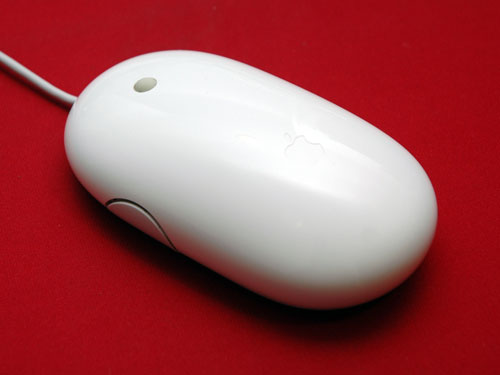
Apple Mighty Mouse goes ABSOLUTELY BERZERK!


OK, so it's 2:11 AM and I finally figured out why my Apple Mighty Mouse is going berserk.

First, some background. The might mouse is touch sensitive, meaning the top shell can sense where your fingers are and produce the correct type of click, according to where your fingers are. For example, both fingers down will default to a left click, while lifting your index finger (if you're right handed) will produce a left click because it can sense that your left finger is off the top of the shell.

So this evening, I had a little work to do on the company laptop. I pushed my mac keyboard and mouse out of the way to make room for the laptop, did my work, then closed the lid (left the laptop on), and then proceeded to use my mac with the keyboard and mouse.

I noticed some peculiar things happening with my mouse. See, the Mighty Mouse has two side buttons--one on either side--when you squeeze them, it makes a little clicking sound and activates exposé. What was happening this evening was that ANY time I touched my mouse, I'd hear the clicking sound and exposé would activate. It seemed to get worse, then better, then worse again, seemingly at random. Sometimes, it got so bad that it would literally toggle back and forth between activated and deactivated, many times per second--while my hand was simply resting on the damned thing. I could hear the clicks. It was insane.

But it only did it seemingly at random, which pissed me off. So, I sought out a solution.

At first, I tried to take the mouse apart... but in fear of breaking the damn thing, I chose to find other alternatives. Scouring the web left me with nothing--apparently the only major problem people have with the Mighty Mouse has to do with the scroll ball. Alas, I was about to give up and bring it to the Apple Store when I woke up.

But then it hit me: maybe this isn't a mechanical problem, but an electrical problem. Could the Mighty Mouse be short circuiting? Impossible; I bought my Mac over the summer of 2008, and Apple makes some pretty high quality products so I doubt I'd see my poor little mouse go belly up in only a few short months.

Nevertheless, I began to test things. Systematically. Starting with the cord, I jiggled it. After a while of going up and down the length of the cord, I discovered that the problems stopped once I hit the base of the cord where it connects to the keyboard. Could this be it? No, but there's a reason, which I'll detail below.

See, the point where the cord connects to the keyboard is the point at which my hand and arm was completely off of my LAPTOP that was sitting on my desk! Once I put my hand/arm back on the laptop and touched my mouse, crazy shit began to happen again. This was it!

Upon my enlightenment, I smiled with delight--for a couple reasons. One, I fixed my problem myself (yay me!) but two, I don't have to waste time at the Apple Store looking like a total loser because my symptoms would never have shown up. Imagine: "Hi, my mouse is going crazy." Apple tech: "Looks fine to me." Me: "Fuck. Never fails; you go to the doctor for medicine, but magically, by the time you arrive, you feel much better than you did 30 minutes ago."

So I got all excited to write this post to share with the world my discovery, and moved my laptop from the desk to my lap, so I could access my keyboard. As soon as I touched my mouse, what do you think happened? Well I'll be damned: same problem. Mouse went haywire again.

I then put the damn thing on the floor (avoiding contact with it) and what do you know? Mouse is perfectly normal.

So the bottom line is this: this damned Mighty Mouse is sensitive to electrical impulses, such that if an electrical current flows through the top shell that's more than a human's, it throws the whole damn thing out of whack.

2.5 hours of my life wasted, but at least now I know, and so do you.

Friday, December 5, 2008

Scotty: Log Me In


Recently I've found myself spending more and more time wishing I could log into my home computer from work. My home computer's a Mac, which explains why I can't simply Remote Desktop from my work laptop running Windows XP. In addition to that, the corporate firewall creates more connectivity issues than I knew existed. What a drag.

But then I found a service on the internet called LogMeIn. All you have to do is create an account, then download the LogMeIn software to the computer you want to log into from a remote location. Once that's done, remote control of your computer is as simple as visiting LogMeIn.com, and literally logging in. Once authenticated, you can click the Remote Control button and be connected to your home computer via your web browser. (Side note: for the best experience, you'll need to install a small browser plug-in, available for Internet Explorer, Firefox, and other browsers.)

Amazingly, this even works using the iPhone. If you're on a WiFi connection, you can access your home computer (or whatever other computer you've set up with the LogMeIn software) remotely and I must say it works great.

Best part: the service is free. You can't copy files or print to a local printer--for that, you pay extra--but that's why it's free. LogMeIn is willing to bet that if you start using its free service, you'll eventually come to appreciate the value of the added functionality of the paid services it offers, of which there are several.

Sunday, April 20, 2008

iPhone speaker volume too soft/quiet? Try this.

If your iPhone's speakers just aren't loud enough, give this a try.

Just a fair warning: doing this will most likely void your warranty, if you care about things like that.

Items required: safety pin or other small, sharp object to prick small holes
  1. Open the iPod application and start a song playing so you can hear the "before" volume and how much it sucks.
  2. Locate your iPhone's speaker. (If you're looking directly at the phone, it's on the bottom-left.)
  3. Using a needle, safety pin or other small sharp object, prick a few holes in the plastic layer that separates the speaker from the outside world. (Why did Apple put this plastic piece here, anyway, knowing how much it dampens the sound and makes the speaker all but useless? Who knows... maybe to protect against moisture damage? Oh well.) Prick as many holes as you'd like. I pricked every last one of those suckers.
  4. Marvel at your ingenuity and enjoy the much louder volume of your coveted iPhone.

Saturday, March 29, 2008

iTunes won't close on Windows XP (SP2); uses 50% CPU

UPDATE 6/16/08: If you run NOD32 as your antivirus program, you might want to try this little trick (thanks, nka!): This article describes how to add iTunes to NOD32's exclusion list if you're running Windows XP. If you're running Vista, simply upgrade (free) to the new version of NOD32. If that doesn't work for you, try what I mentioned on the 5/16/08 update below.

UPDATE 5/16/08: Astute readers point out that simply disabling the Bonjour service as follows should solve the problem: Start > Run > services.msc > Double-Click on Bonjour service > Stop it > and in the Startup Type dropdown list, select Disabled. Then disable sharing in iTunes.


If you're reading this, it's probably because you're running Windows XP and iTunes won't exit/close/quit on its own unless you force it to quit (i.e., End Process in the Task Manager). You've been searching for a solution, but have found none.

Maybe you're just about to give up hope. I know I almost did. But then I fought back--and found an answer. Fair warning, though: it's a little extreme. You can experiment and cut out certain steps as you see fit, but I can't guarantee you'll enjoy the success I am currently enjoying. It's up to you.

And so, without further adieu, here's how to get iTunes back up and running (and closing on its own) once again:

0. Read through these instructions to have an idea of what you're going to do before you decide to do it.

1. Add/Remove Programs

2. Remove iTunes (In addition, I removed ALL Apple products, just to be safe, listed as 2.1-2.4)
2.1. Apple Mobile Device Support
2.2. Apple Software Update
2.3. Bonjour
2.4. Quicktime

3. Delete all leftover Apple-related files from C:\Documents and Settings\*
3.0. Note: do NOT delete anything in C:\Documents and Settings\YOUR USER NAME HERE\My Documents\My Music\iTunes (or wherever you store your iTunes music library file. iTunes will automatically use these files again if they're in the default location.
3.1. C:\Documents and Settings\All Users\Application Data\Apple Computer
3.2. C:\Documents and Settings\YOUR USER NAME HERE\Application Data\Apple Computer
3.3. C:\Documents and Settings\YOUR USER NAME HERE\Local Settings\Application Data\Apple
3.4. C:\Documents and Settings\YOUR USER NAME HERE\Local Settings\Application Data\Apple Computer

4. Delete all leftover Apple-related registry entries from the Registry
4.0. WARNING: Make a backup copy first. If you don't know much/anything about the registry, I'd skip this part unless you feel ballsy and like living on the wild side.
4.1. I use a tool called jv 16 PowerTools 2007 to make this task a little more efficient. Otherwise, it's time to just use the Find funciton of the Registry and do the dirty work.

5. Restart (save how-to guide, if you're writing one at the time) ;)

6. DO NOT UNDER ANY CIRCUMSTANCES WHATSOEVER enable the "Share my library on my local network" feature. This will result in iTunes exhibiting the lock-up you experienced upon closing, and it is impossible to recover from this and reset your iTunes preferences unless you follow the painful steps above. This is about my 3rd or 4th time doing this, so I'm confident this will work for you.

Good luck!

Monday, September 10, 2007

iPhone, therefore iAm

So I just got my new iPhone on Saturday September 8th. Man, what a joy this thing is to use. I will admit that there are a few shortcomings that have been covered by other sites. The first I encountered was that seemingly almost any iPhone case or cover that you buy is not dockable. (UPDATE: InvisibleShield is dockable, I bought one, and it's worth every penny.) Few are, and these few typically have the bottom-left and bottom-right corners chisled out of the case's design to allow dockability. Of course, you could get a screen cover to protect the glass screen, but after PC World's torture test, I'm not really sure if it's necessary.

A point to note: iPhone does not come with a native IM application. However, as of August 15th, meebo.com is your one-stop shop to temporarily solve this mess until native apps arrive on the scene from either Apple itself, or other third-party developers and a little hackery. With Meebo, you use Safari to browse to the main page. Meebo detects iPhone as the browsing device, and delivers a specially coded version of its site that looks and feels like a native iPhone app. Pretty cool.

The only downside to this is that if you move away from that one "dynamic web page" of sorts (i.e., open a new browser window or switch to another application within iPhone), you have no idea whether or not you've received any IMs--although it appears you remain logged into the messaging client as long as you have an internet connection.

Tuesday, June 12, 2007

Safari for Windows is out

In its classic, secretive fashion, Apple has just announced the launch of its Safari web browser for the Windows platform. It works on both Windows XP and Vista. It still shows signs it's in beta form, as the application crashes every now and then when browsing certain web sites.

Can't really say much about it, other than I am pleased to see that much of the Apple user interface has made it into this program, right down to the aqua scrollbar, arrows, and smooth flowing dialogue boxes (try bookmarking this page in Safari, for instance). They even got the glowing buttons right.

However, this is a beta and there are plenty of things to complain about. Since there are thousands of other tech writers out there I'll leave the details to them. I just wanted to write this post in Safari to test how it interacts with different web sites.

It's no replacement to Firefox just yet since it's still in beta, but once it's a finished product for Windows, it'll be a contender. The one thing I really like about firefox is all the plugins. NoScript, FasterFox and the IE Tab plugins are truly useful, as is the crash guard built into Firefox. (If the browser crashes for some reason, you can restore your previous browsing session, for example.)